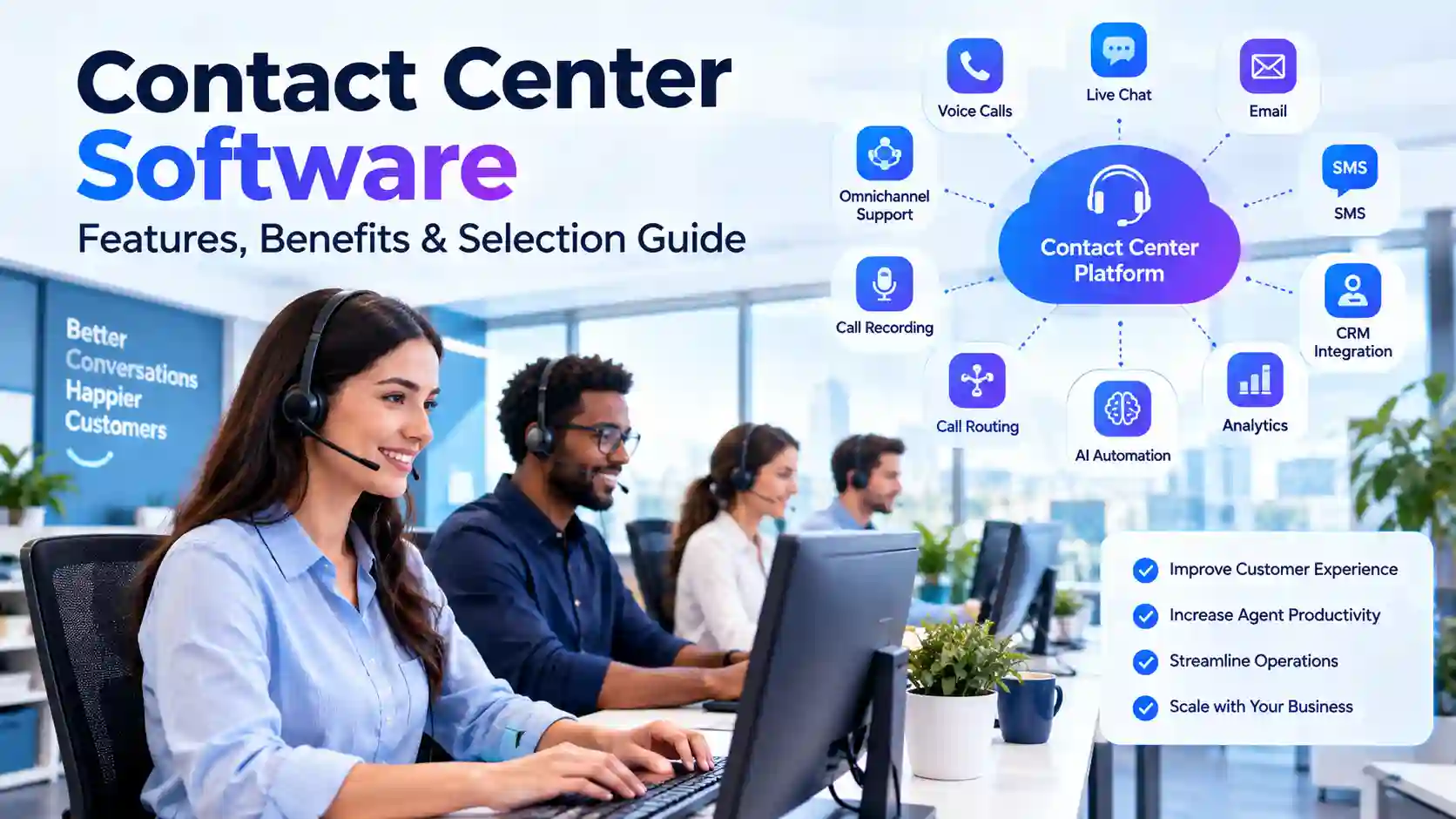
Customer service can become difficult when calls, messages, and emails use separate systems. Agents may lose customer details, while managers struggle to track performance. A modern contact center software platform brings these communication channels into one organized workspace. As a result, businesses can manage customer conversations more efficiently and create a smoother support process.
The wrong system can also create new problems. Complex interfaces may slow agents, while weak integrations can create duplicate customer records. Furthermore, poor reporting can make service problems difficult to identify. The right solution connects communication, customer data, automation, and reporting in one place. This guide explains how contact center software works and what businesses should evaluate before choosing one.
What Is Contact Center Software?
Contact Center Software Explained Simply
Contact center software is a digital platform that helps businesses manage customer communications. It can support voice calls, email, chat, text messages, and other digital channels. Instead of handling each channel through separate systems, agents can often access conversations through one central interface.
The software can also connect customer information with communication history. Therefore, an agent may understand previous interactions before answering a new request. This context can reduce repeated questions and help create more consistent support. Depending on the platform, businesses can also add automation, analytics, call recording, workforce tools, and customer relationship management integrations.
Contact Center vs. Call Center Software
Call center software mainly focuses on voice communication. Contact center software usually supports a wider range of customer communication channels. These channels may include voice, email, live chat, SMS, social messaging, and other digital interactions.
This difference matters because customers do not always use phone calls for support. Many customers prefer digital channels for simple questions and updates. Therefore, businesses with multiple communication channels may need a broader platform. However, a company with mostly phone-based support may need fewer features.
How the Software Fits Into Customer Service
A contact center platform usually sits between customers and support teams. Incoming interactions enter the system, while routing tools help direct them to suitable agents. The platform can then store interaction details and provide managers with useful reports.
Modern systems can also connect with CRM platforms and business applications. Consequently, agents can work with customer information without switching between many tools. This connected approach can improve workflow efficiency while giving managers a clearer view of customer operations.
Key Features of Contact Center Software
Automatic Call Distribution
Automatic call distribution, often called ACD, helps route incoming calls to available agents. Routing rules can consider departments, skills, availability, or other business conditions. Therefore, customers can reach an agent who is better suited to their request.
ACD can become especially useful for larger support teams. Without organized routing, calls may reach the wrong department or create unnecessary transfers. A well-configured system can reduce these problems. However, routing rules should remain simple enough for managers to maintain.
Interactive Voice Response
Interactive voice response, or IVR, allows callers to interact with automated menus. Callers can select options using their keypad or voice commands. An IVR system can collect basic information before sending the interaction to an agent.
For example, a customer may select billing, technical support, or account assistance. The system can then direct the caller to the appropriate queue. Furthermore, simple requests may sometimes be handled automatically. This can reduce pressure on agents while keeping routine interactions organized.
Omnichannel Communication
Omnichannel communication allows businesses to manage several customer channels within a connected environment. These channels can include voice, chat, email, SMS, and social messaging. The exact options depend on the platform.
The main benefit comes from maintaining context across interactions. A customer may begin with chat and later contact the business by phone. When systems share interaction history, the agent can understand the previous conversation. This can reduce repetition and create a smoother support experience.
Call Recording and Quality Monitoring
Many platforms provide call recording and quality management features. Managers can review selected interactions to identify training needs and service issues. Recorded calls can also help businesses understand common customer questions.
However, businesses should handle recordings carefully. Privacy rules and customer consent requirements can vary by location and situation. Therefore, organizations should review applicable laws and configure recording practices responsibly.
How Contact Center Software Improves Customer Service
Faster Agent Workflows
Agents often need information from several systems during one customer interaction. Constantly switching between applications can consume time and create mistakes. Contact center software can bring communication tools and customer information into one workspace. For remote teams, a reliable internet connection also matters, so businesses can use an Xfinity speed test to check basic connection performance.
This centralized workflow can make common tasks easier. For example, an agent may see customer details, previous interactions, and support notes together. As a result, the agent can spend more time solving the customer’s problem rather than searching for information.
Better Customer Context
Customer context helps agents understand what happened before a new interaction. A customer may have already contacted support through another channel. Without interaction history, the customer might need to explain the entire problem again.
A connected contact center can preserve useful conversation details. Therefore, agents can review previous requests and continue the conversation more naturally. This can become especially important for complex issues that require several support interactions.
More Consistent Support
Consistency matters when many agents serve the same customer base. Different agents may otherwise use different processes or provide different information. Shared tools can help teams follow common workflows.
Managers can create routing rules, scripts, knowledge resources, and quality processes. These tools can support more consistent service across teams. However, software alone cannot guarantee quality. Training and clear service policies remain important parts of customer support.
Benefits of Contact Center Software for Businesses
Improved Operational Efficiency
Businesses often want to reduce unnecessary work without reducing service quality. Automation can handle certain repetitive tasks, while routing tools can organize incoming interactions. Agents can then focus more attention on conversations that need human support.
The platform can also reduce the need for disconnected communication tools. When several functions operate together, employees may spend less time moving information between systems. Therefore, businesses can create a more organized customer service workflow.
Useful Performance Analytics
Analytics can help managers understand what happens inside a contact center. Depending on the platform, reports may cover call volume, response times, queue activity, agent performance, and customer interactions.
These measurements can reveal patterns that are difficult to see manually. For example, managers may notice that certain hours create unusually long queues. They can then adjust staffing or routing strategies. Good analytics should support decisions rather than create unnecessary reporting work.
Easier Business Scaling
A small support team may start with basic communication needs. As the business grows, customer interactions can increase across several channels. A flexible platform can help businesses add users, channels, and workflows over time.
Cloud-based systems can make expansion easier because businesses may not need to maintain traditional on-site hardware. However, scaling still requires planning. Companies should review pricing, storage, integrations, security, and administrative needs before expanding.
Cloud Contact Center Software vs. On-Premises Systems
How Cloud Platforms Work
Cloud contact center platforms run through internet-connected infrastructure. Businesses generally access the software through supported applications or web interfaces. The provider manages much of the underlying infrastructure.
This model can reduce some hardware responsibilities for internal IT teams. It may also support remote agents more easily when secure access is available. However, internet reliability becomes an important consideration. Businesses should also examine the provider’s security, uptime practices, data controls, and support options.
How On-Premises Systems Work
On-premises systems operate on infrastructure controlled by the business. The organization may manage servers, software updates, networking, security controls, and maintenance. This model can provide direct control over certain technical environments.
However, that control can require additional resources. Businesses may need dedicated staff and hardware to maintain the platform. Expansion can also require more planning and infrastructure. Therefore, the operating model should match the company’s technical resources and business requirements.
Choosing Between Cloud and On-Premises
The choice depends on business size, security requirements, technical resources, and operational goals. A company with limited infrastructure resources may prefer a managed cloud approach. Another organization may have specific technical requirements that influence its deployment decision.
Neither model automatically fits every business. Therefore, decision makers should evaluate the complete operating environment. They should consider implementation, maintenance, integrations, security, scalability, and long-term costs.
Contact Center Software and CRM Integration
Connecting Customer Data
Customer relationship management systems store valuable information about customers and their history. Contact center software can connect with CRM platforms to make that information available during interactions.
For example, an agent may see a customer’s account details when a call arrives. The agent can then review previous support activity before responding. This connection can reduce repeated questions and support more informed conversations.
Improving Agent Productivity
CRM integration can reduce manual data entry. Without integration, agents may need to copy information between multiple systems. That process can increase errors and slow down support work.
With connected systems, interaction details can sometimes move between platforms automatically. The exact capabilities depend on the software and integration method. Therefore, businesses should confirm which CRM systems are supported before choosing a platform.
Creating a Connected Customer Journey
Customers may interact with sales, support, billing, and account teams. A disconnected system can make these interactions feel fragmented. CRM integration can help teams share relevant customer information.
Consequently, businesses can create a more connected customer journey. Agents can understand previous interactions and account history. This does not replace good communication, but it gives employees better information for each conversation.
How AI Is Changing Contact Center Software
AI-Powered Customer Support
Artificial intelligence is becoming an important feature in modern customer service platforms. AI tools can help classify requests, suggest responses, summarize conversations, and support automated customer interactions.
These features can reduce repetitive work for agents. However, AI-generated information still requires appropriate oversight. Businesses should review accuracy, privacy, security, and escalation processes before using AI for customer-facing tasks.
AI Chatbots and Virtual Agents
AI chatbots can answer common customer questions without requiring a human agent. They can provide information about basic processes, account questions, or frequently requested details.
More complex issues can then move to human agents. This approach allows automation to handle suitable requests while preserving human support for sensitive situations. The quality of the experience depends heavily on accurate knowledge sources and well-designed escalation rules.
Conversation Summaries and Agent Assistance
AI can also help agents during or after customer interactions. Some platforms can summarize conversations and identify important details. This can reduce the time agents spend writing manual notes.
Agent assistance can also suggest information during conversations. However, businesses should treat AI suggestions as support rather than unquestioned answers. Human review remains important when customer issues involve sensitive or complex decisions.
Security and Privacy Considerations
Protecting Customer Information
Contact centers can handle sensitive customer information. This information may include names, account details, payment information, conversations, and other personal data. Therefore, security should be a major part of software selection.
Businesses should review access controls, encryption practices, authentication options, audit logs, and data handling policies. The right controls depend on the business and its legal obligations. Security should also cover agents, administrators, integrations, and connected devices.
Managing Call Recordings
Call recordings can contain valuable information. They can also contain sensitive personal details. Businesses should therefore establish clear policies for recording, storing, accessing, and deleting calls.
Retention periods should match business needs and applicable requirements. Access should also be limited to authorized employees. Businesses handling payment information should review the relevant PCI Security Standards Council guidance when applicable.
Following Security Frameworks
Security teams can use established frameworks when evaluating technology risks. The NIST Cybersecurity Framework provides guidance for managing cybersecurity risk across organizations.
Businesses can use recognized frameworks as part of broader security planning. However, no framework automatically makes a platform secure. Organizations still need proper configuration, employee training, access controls, monitoring, and regular reviews.
How to Choose Contact Center Software
Define Business Requirements First
The selection process should begin with business needs. A company should identify its communication channels, agent count, customer volume, CRM systems, and reporting requirements.
It should also identify the problems the new system needs to solve. For example, the goal may involve reducing transfers, improving response times, or connecting separate communication channels. Clear requirements make software comparisons more useful.
Compare Important Features
Businesses should compare features based on actual needs rather than long feature lists. Useful areas can include voice support, digital channels, IVR, routing, analytics, recording, workforce tools, CRM integration, and automation.
Pricing should also be examined carefully. Some providers charge per user, while others use usage-based or feature-based pricing. Additional costs may apply for integrations, storage, advanced analytics, or premium support.
Evaluate User Experience
Agents use the system throughout their working day. Therefore, the interface should be clear and practical. Complicated workflows can reduce the value of otherwise powerful features.
Businesses should request demonstrations or trials when available. A real workflow test can reveal problems that are not obvious during a sales presentation. Managers should involve actual agents in testing because they understand daily support tasks.
Review Support and Reliability
Software support becomes important when customer communications depend on the platform. Businesses should review support channels, response processes, documentation, and service commitments.
Reliability should also receive careful attention. A contact center platform may support critical customer operations. Therefore, businesses should understand how the provider handles outages, maintenance, backups, and service disruptions.
Common Mistakes When Choosing Contact Center Software
Choosing Too Many Features
A platform can offer dozens of features without solving the main business problem. More features can also increase complexity and cost.
Therefore, businesses should prioritize capabilities that support real workflows. Extra features can be useful later, but they should not replace clear requirements. A simple system that agents understand can be more practical than an overloaded platform.
Ignoring Integration Requirements
A contact center rarely works alone. Businesses may already use CRM, help desk, billing, workforce, analytics, and communication systems.
Ignoring integrations can create expensive problems after implementation. Therefore, businesses should confirm compatibility before signing a contract. They should also understand whether integrations require additional fees or technical development.
Focusing Only on Price
Software price matters, but it does not represent the full cost. Implementation, training, integrations, storage, support, and administration can affect total ownership costs.
A low subscription price may become less attractive if the platform requires extensive customization. Therefore, businesses should compare the complete cost and expected operational value. This approach provides a more realistic view of the investment.
How to Implement Contact Center Software Successfully
Prepare Agents Before Launch
Employees should understand why the organization is introducing the new platform. Training should cover daily tasks rather than only technical features.
Agents should practice common workflows before the system becomes fully operational. This can include receiving calls, transferring conversations, updating records, using customer history, and escalating issues. Practical training can reduce confusion during launch.
Start With Clear Workflows
Implementation should begin with simple, documented processes. Teams should define how calls are routed and how digital interactions are assigned. They should also establish escalation rules.
Clear workflows make testing easier. They can also expose problems before customers experience them. Therefore, businesses should test common and unusual scenarios before completing the rollout.
Monitor Performance After Launch
Implementation does not end when the software becomes active. Managers should continue reviewing performance and agent feedback. Remote contact centers should also monitor whether employees have a stable internet connection. Businesses can review factors such as reliability and coverage when comparing the best internet service provider options for their teams.
Reports can show whether the system improves key workflows. Agent feedback can reveal interface problems or missing features. Consequently, businesses can adjust settings and processes as actual usage provides new information.
Frequently Asked Questions
What is contact center software used for?
Contact center software helps businesses manage customer communication across channels. Depending on the platform, it can support voice calls, email, chat, SMS, social messaging, routing, analytics, and automation. It can also connect customer information with communication history.
What is the difference between contact center and call center software?
Call center software mainly focuses on telephone communication. Contact center software usually supports voice plus digital channels such as chat, email, and messaging. Therefore, contact center platforms can support broader communication strategies.
Is contact center software suitable for small businesses?
Small businesses can use contact center platforms when their communication needs justify the investment. Cloud solutions can provide flexible access without requiring extensive on-site infrastructure. However, businesses should select features that match their actual team size and customer volume.
Does contact center software include CRM integration?
Many modern platforms offer CRM integrations, although supported systems differ between providers. Integration can help agents access customer details and interaction history. Businesses should confirm compatibility before selecting a platform.
Can contact center software support remote agents?
Many cloud platforms can support remote agents through internet-connected applications. However, businesses still need secure access, reliable internet connections, suitable devices, and clear security policies. Remote work features should therefore be evaluated during software selection.
Does contact center software use artificial intelligence?
Many modern platforms include AI features such as chatbots, conversation summaries, routing assistance, and suggested responses. However, capabilities vary widely between providers. Businesses should evaluate accuracy, privacy, human oversight, and escalation controls before deployment.
How much does contact center software cost?
Pricing varies based on users, features, channels, usage, integrations, and support levels. Some providers use per-user pricing, while others use usage-based models. Businesses should compare total costs instead of looking only at the advertised subscription price.
What should businesses check before buying contact center software?
Businesses should review features, integrations, security, pricing, scalability, usability, support, and reliability. They should also test realistic workflows before making a decision. A clear requirements list can make the comparison process more practical.
Conclusion:
Contact center software can bring customer conversations, agent workflows, automation, analytics, and customer information into one connected environment. The right platform can reduce unnecessary work and help teams manage customer interactions more consistently. However, software selection should begin with real business needs rather than a long list of impressive features.
Businesses should compare communication channels, integrations, security controls, pricing, usability, and scalability before choosing a platform. They should also involve agents during testing and review performance after launch. For companies exploring modern customer service technology, the next step is to define clear requirements and evaluate platforms against those practical needs.
2 thoughts on “Contact Center Software: Complete Guide to Features and Benefits”